





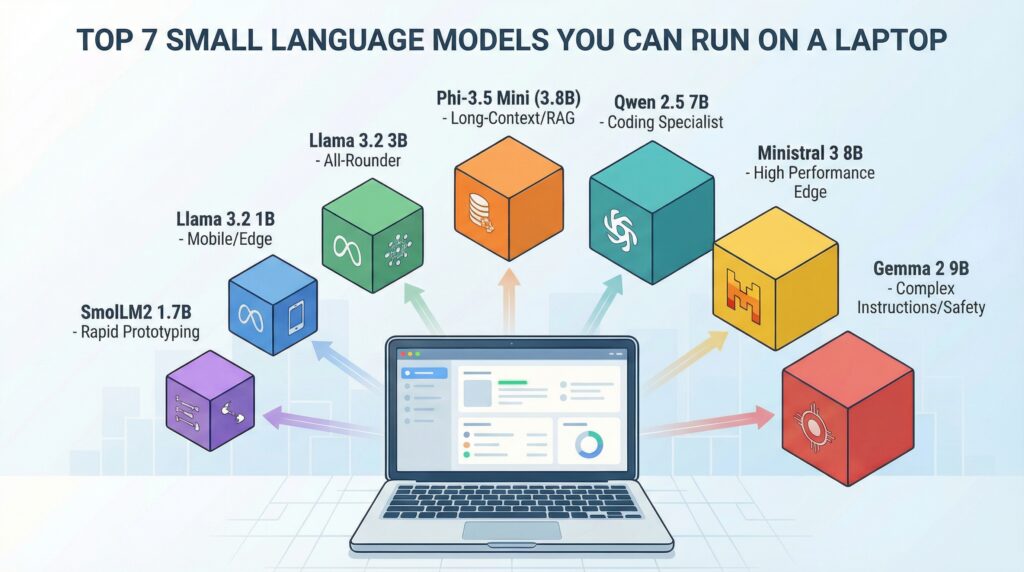
Top 7 Small Language Models You Can Run on a Laptop
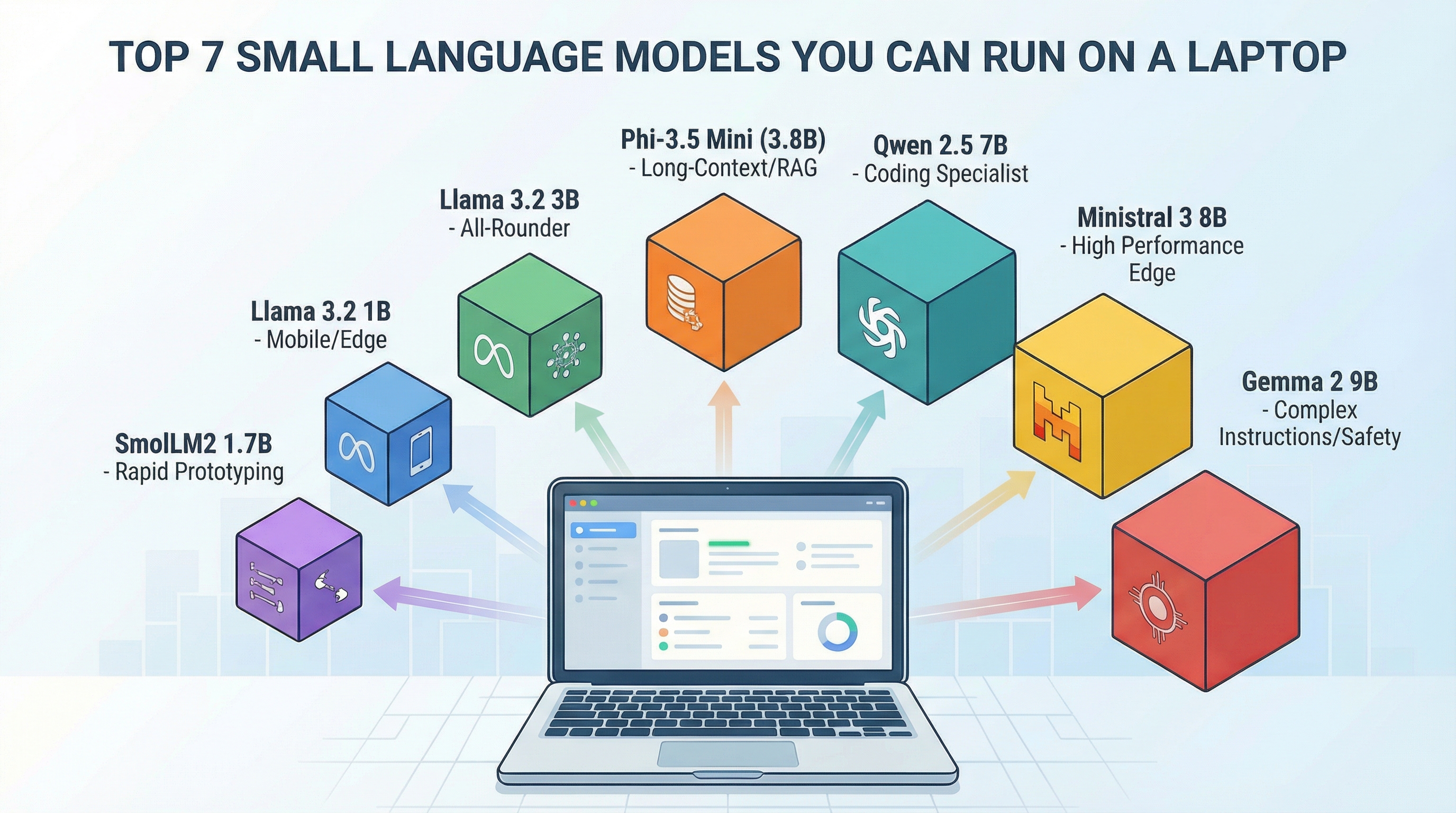
Top 7 Small Language Models You Can Run on a Laptop (click to enlarge)
Image by Author
Introduction
Powerful AI now runs on consumer hardware. The models covered here work on standard laptops and deliver production-grade results for specialized tasks. You’ll need to accept license terms and authenticate for some downloads (especially Llama and Gemma), but once you have the weights, everything runs locally.
This guide covers seven practical small language models, ranked by use case fit rather than benchmark scores. Each has proven itself in real deployments, and all can run on hardware you likely already own.
Note: Small models ship frequent revisions (new weights, new context limits, new tags). This article focuses on which model family to choose; check the official model card/Ollama page for the current variant, license terms, and context configuration before deploying.
1. Phi-3.5 Mini (3.8B Parameters)
Microsoft’s Phi-3.5 Mini is a top choice for developers building retrieval-augmented generation (RAG) systems on local hardware. Released in August 2024, it is widely used for applications that need to process long documents without cloud API calls.
Long-context capability in a small footprint. Phi-3.5 Mini handles very long inputs (book-length prompts depending on the variant/runtime), which makes it a strong fit for RAG and document-heavy workflows. Many 7B models max out at much shorter default contexts. Some packaged variants (including the default phi3.5 tags in Ollama’s library) use shorter context by default — verify the specific variant/settings before relying on maximum context.
Best for: Long-context reasoning (reading PDFs, technical documentation) · Code generation and debugging · RAG applications where you need to reference large amounts of text · Multilingual tasks
Hardware: Quantized (4-bit) requires 6-10GB RAM for typical prompts (more for very long context) · Full precision (16-bit) requires 16GB RAM · Recommended: Any modern laptop with 16GB RAM
Download / Run locally: Get the official Phi-3.5 Mini Instruct weights from Hugging Face (microsoft/Phi-3.5-mini-instruct) and follow the model card for the recommended runtime. If you use Ollama, pull the Phi 3.5 family model and verify the variant/settings on the Ollama model page before relying on maximum context. (ollama pull phi3.5)
2. Llama 3.2 3B
Meta’s Llama 3.2 3B is the all-rounder. It handles general instruction-following well, fine-tunes easily, and runs fast enough for interactive applications. If you’re unsure which model to start with, start here.
Balance. It’s not the best at any single task, but it’s good enough at everything. Meta supports 8 languages (English, German, French, Italian, Portuguese, Hindi, Spanish, Thai), with training data covering more. Strong instruction-following makes it versatile.
Best for: General chat and Q&A · Document summarization · Text classification · Customer support automation
Hardware: Quantized (4-bit) requires 6GB RAM · Full precision (16-bit) requires 12GB RAM · Recommended: 8GB RAM minimum for smooth performance
Download / Run locally: Available on Hugging Face under the meta-llama org (Llama 3.2 3B Instruct). You’ll need to accept Meta’s license terms (and may need authentication depending on your tooling). For Ollama, pull the 3B tag: ollama pull llama3.2:3b.
3. Llama 3.2 1B
The 1B version trades some capability for extreme efficiency. This is the model you deploy when you need AI on mobile devices, edge servers, or any environment where resources are tight.
It can run on phones. A quantized 1B model fits in 2-3GB of memory, making it practical for on-device inference where privacy or network connectivity matters. Real-world performance depends on your runtime and device thermals, but high-end smartphones can handle it.
Best for: Simple classification tasks · Basic Q&A on narrow domains · Log analysis and data extraction · Mobile and IoT deployment
Hardware: Quantized (4-bit) requires 2-4GB RAM · Full precision (16-bit) requires 4-6GB RAM · Recommended: Can run on high-end smartphones
Download / Run locally: Available on Hugging Face under the meta-llama org (Llama 3.2 1B Instruct). License acceptance/authentication may be required for download. For Ollama: ollama pull llama3.2:1b.
4. Ministral 3 8B
Mistral AI released Ministral 3 8B as their edge model, designed for deployments where you need maximum performance in minimal space. It is competitive with larger 13B-class models on practical tasks while staying efficient enough for laptops.
Strong efficiency for edge deployments. The Ministral line is tuned to deliver high quality at low latency on consumer hardware, making it a practical “production small model” option when you want more capability than 3B-class models. It uses grouped-query attention and other optimizations to deliver strong performance at 8B parameter count.
Best for: Complex reasoning tasks · Multi-turn conversations · Code generation · Tasks requiring nuanced understanding
Hardware: Quantized (4-bit) requires 10GB RAM · Full precision (16-bit) requires 20GB RAM · Recommended: 16GB RAM for comfortable use
Download / Run locally: The “Ministral” family has multiple releases with different licenses. The older Ministral-8B-Instruct-2410 weights are under the Mistral Research License. Newer Ministral 3 releases are Apache 2.0 and are preferred for commercial projects. For the most straightforward local run, use the official Ollama tag: ollama pull ministral-3:8b (may require a recent Ollama version) and consult the Ollama model page for the exact variant/license details.
5. Qwen 2.5 7B
Alibaba’s Qwen 2.5 7B dominates coding and mathematical reasoning benchmarks. If your use case involves code generation, data analysis, or solving math problems, this model outperforms competitors in its size class.
Domain specialization. Qwen was trained with heavy emphasis on code and technical content. It understands programming patterns, can debug code, and generates working solutions more reliably than general-purpose models.
Best for: Code generation and completion · Mathematical reasoning · Technical documentation · Multilingual tasks (especially Chinese/English)
Hardware: Quantized (4-bit) requires 8GB RAM · Full precision (16-bit) requires 16GB RAM · Recommended: 12GB RAM for best performance
Download / Run locally: Available on Hugging Face under the Qwen org (Qwen 2.5 7B Instruct). For Ollama, pull the instruct-tagged variant: ollama pull qwen2.5:7b-instruct.
6. Gemma 2 9B
Google’s Gemma 2 9B pushes the boundary of what qualifies as “small.” At 9B parameters, it’s the heaviest model on this list, but it is competitive with 13B-class models on many benchmarks. Use this when you need the best quality your laptop can handle.
Safety and instruction-following. Gemma 2 was trained with extensive safety filtering and alignment work. It refuses harmful requests more reliably than other models and follows complex, multi-step instructions accurately.
Best for: Complex instruction-following · Tasks requiring careful safety handling · General knowledge Q&A · Content moderation
Hardware: Quantized (4-bit) requires 12GB RAM · Full precision (16-bit) requires 24GB RAM · Recommended: 16GB+ RAM for production use
Download / Run locally: Available on Hugging Face under the google org (Gemma 2 9B IT). You’ll need to accept Google’s license terms (and may need authentication depending on your tooling). For Ollama: ollama pull gemma2:9b-instruct-*. Ollama provides both base and instruct tags. Pick the one that matches your use case.
7. SmolLM2 1.7B
Hugging Face’s SmolLM2 is one of the smallest models here, designed for rapid experimentation and learning. It’s not production-ready for complex tasks, but it’s perfect for prototyping, testing pipelines, and understanding how small models behave.
Speed and accessibility. SmolLM2 runs in seconds, making it ideal for rapid iteration during development. Use it to test your fine-tuning pipeline before scaling to larger models.
Best for: Rapid prototyping · Learning and experimentation · Simple NLP tasks (sentiment analysis, categorization) · Educational projects
Hardware: Quantized (4-bit) requires 4GB RAM · Full precision (16-bit) requires 6GB RAM · Recommended: Runs on any modern laptop
Download / Run locally: Available on Hugging Face under HuggingFaceTB (SmolLM2 1.7B Instruct). For Ollama: ollama pull smollm2.
Choosing the Right Model
The model you choose depends on your constraints and requirements. For long-context processing, choose Phi-3.5 Mini with its very long context support. If you’re just starting, Llama 3.2 3B offers versatility and strong documentation. For mobile and edge deployment, Llama 3.2 1B has the smallest footprint. When you need maximum quality on a laptop, go with Ministral 3 8B or Gemma 2 9B. If you’re working with code, Qwen 2.5 7B is the coding specialist. For rapid prototyping, SmolLM2 1.7B gives you the fastest iteration.
You can run all of these models locally once you have the weights. Some families (notably Llama and Gemma) are gated; you’ll need to accept terms and may need an access token depending on your download toolchain. Model variants and runtime defaults change often, so treat the official model card/Ollama page as the source of truth for the current license, context configuration, and recommended quantization. Quantized builds can be deployed with llama.cpp or similar runtimes.
The barrier to running AI on your own hardware has never been lower. Pick a model, spend an afternoon testing it on your actual use case, and see what’s possible.